Online Check-in
Turning the worst part of arrival into something guests finish before they land.
- Lead product designer, end-to-end
- Multi-year, pilot to funded global rollout
- PM, PMM, data science, research, engineering, external OCI partners
- Guest check-in, first-party partner Extranet, 45-market legal audit
Impact
- 71%Conversion in the best performing flow
- -25%Passport-step drop-off, after the redesign
- 45Countries of check-in law audited
- Context
- From provider integrations to a first-party hotel tool
- The problem
- Research, and who we designed for
- How we defined success
- Before and after: from pilot to a complete guest journey
- Cut what the law doesn't require
- The trust problem: passport data
- Multi-guest, made native
- How the decisions got made
- Confirming and completing
- A complete arrival system
- Validation after release
- Outcomes
- Learnings
Context
Arrival is the first thing a guest experiences and the last thing anyone designs. Queues at the desk waste the first hour of a trip, and on the supply side they force properties into 24/7 front-desk staffing, a fixed cost small accommodations can't carry. Booking.com wanted guests to complete check-in before they arrived: better for travellers, structurally cheaper for partners, and a capability no other booking platform offered end-to-end.
The first expansion route ran through the online check-in providers hotels already used. Booking.com powered the guest-facing check-in flow; the provider handled the hotel-facing side and its property-management-system (PMS) integration. That reached hotels whose PMS worked with a provider, but left out properties without a supported online check-in solution. I led design from the single-property pilot through the funded global rollout, working with product, research, data science, engineering, property partners and those external providers.
From provider integrations to a first-party hotel tool
To reach hotels that did not already have a provider-supported check-in solution, we built our own first-party Online Check-in tool in the Booking.com partner Extranet. The hotel-facing side was no longer outsourced to an external provider: property teams could find online check-in requests, inspect the submitted guest details and act on arrivals in the system they already used.
I researched the workflows with property managers and check-in solution providers, then tested the requests list and request-detail views. The design had to work for the person processing an arrival as well as the guest completing one. This widened the segment of hotels the product could reach; it was not simply another guest-facing form.
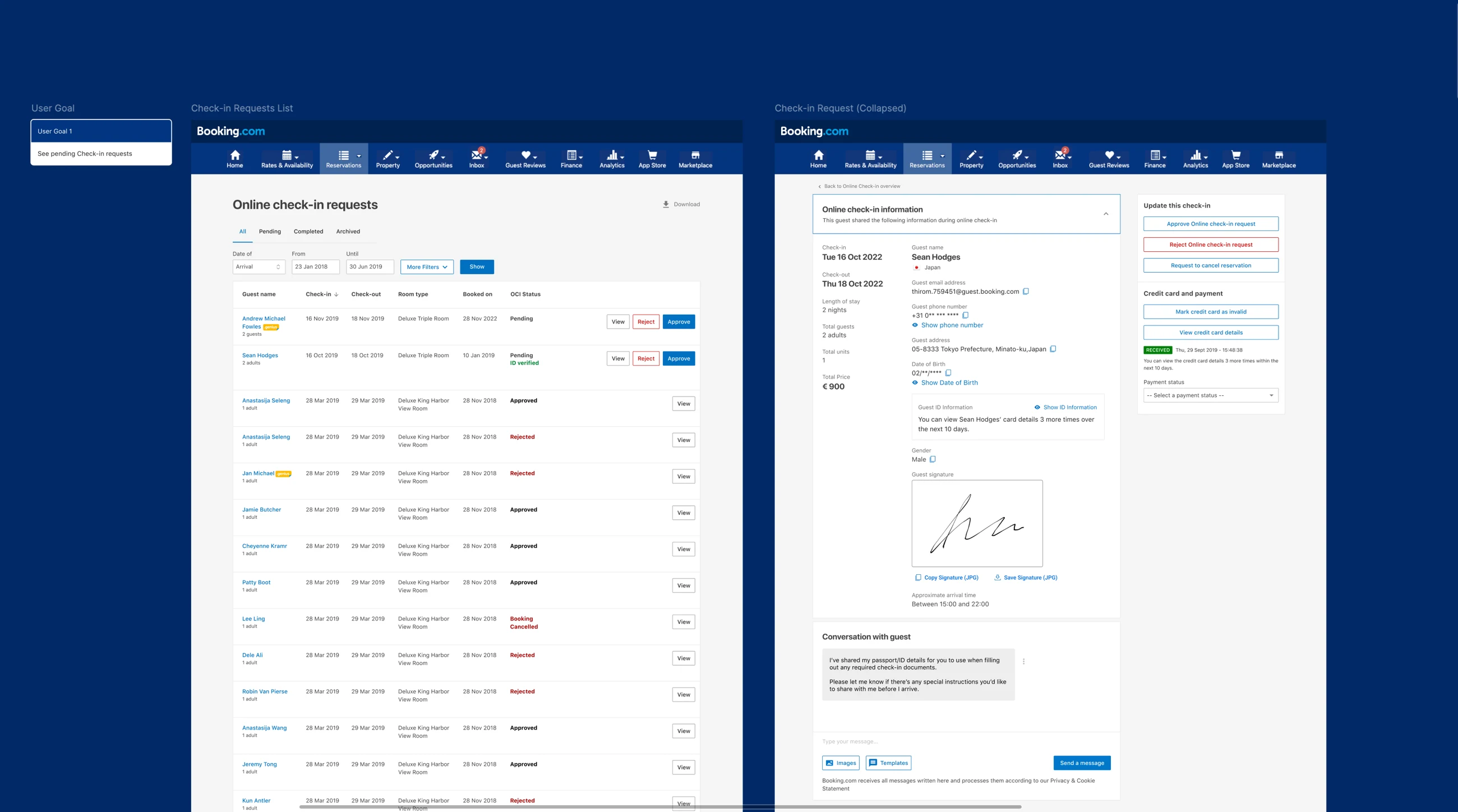
First-party Online Check-in in the partner Extranet: requests at a glance, then the guest details a property needs to process an arrival. Open the figure to inspect it.
The problem
I led the user research, primarily interviews, to locate where the pain actually sat. For guests, waiting at a desk after a long flight or during a peak arrival window was the single most cited frustration, worst for families and late-night arrivals. For properties, check-in was resource-intensive: staff the desk around the clock, or coordinate manual key handovers with guests who cannot tell you when they will show up.
Both sides were paying for the same missing capability: a way to complete the administrative part of arrival before arrival.
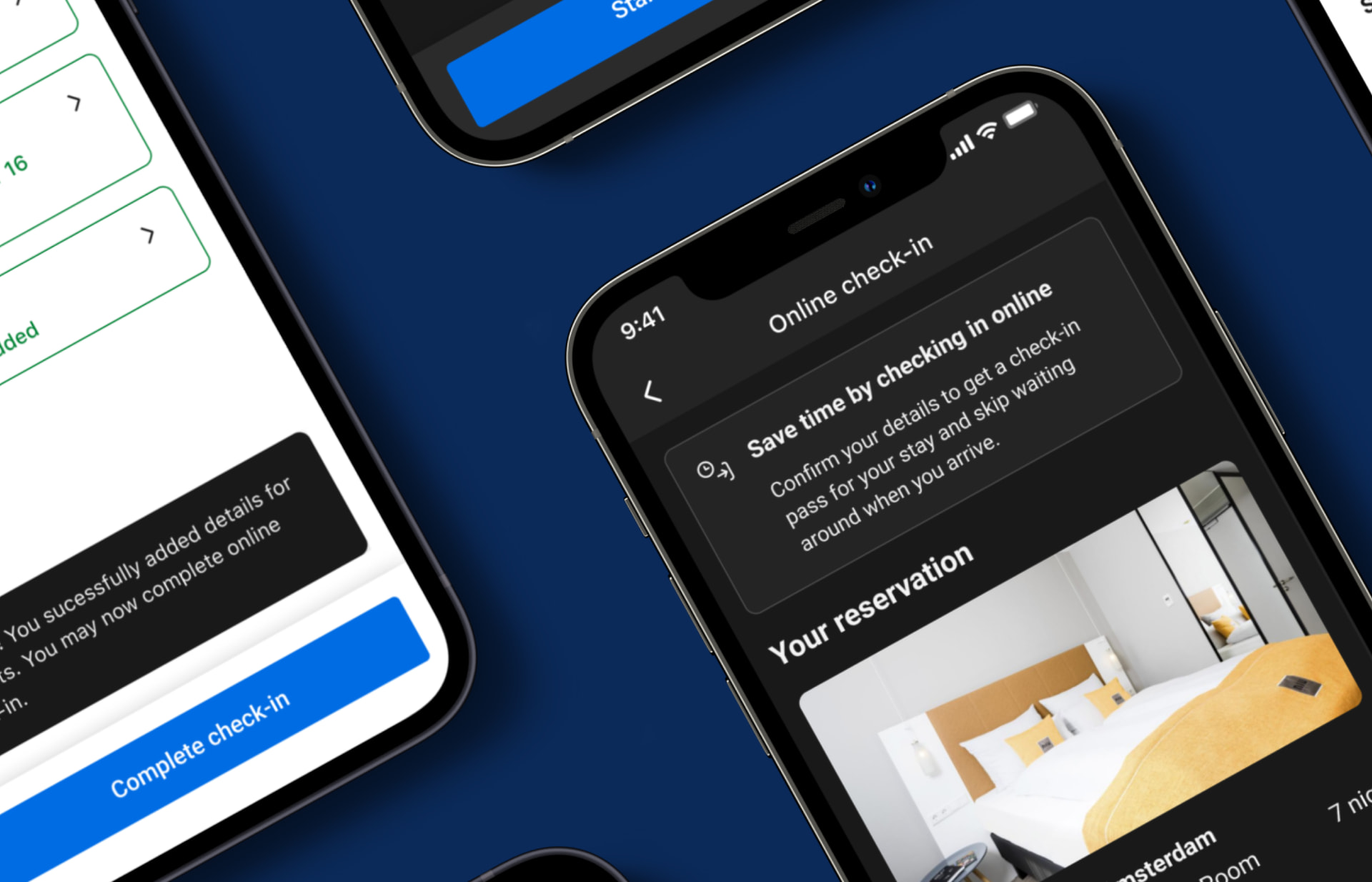
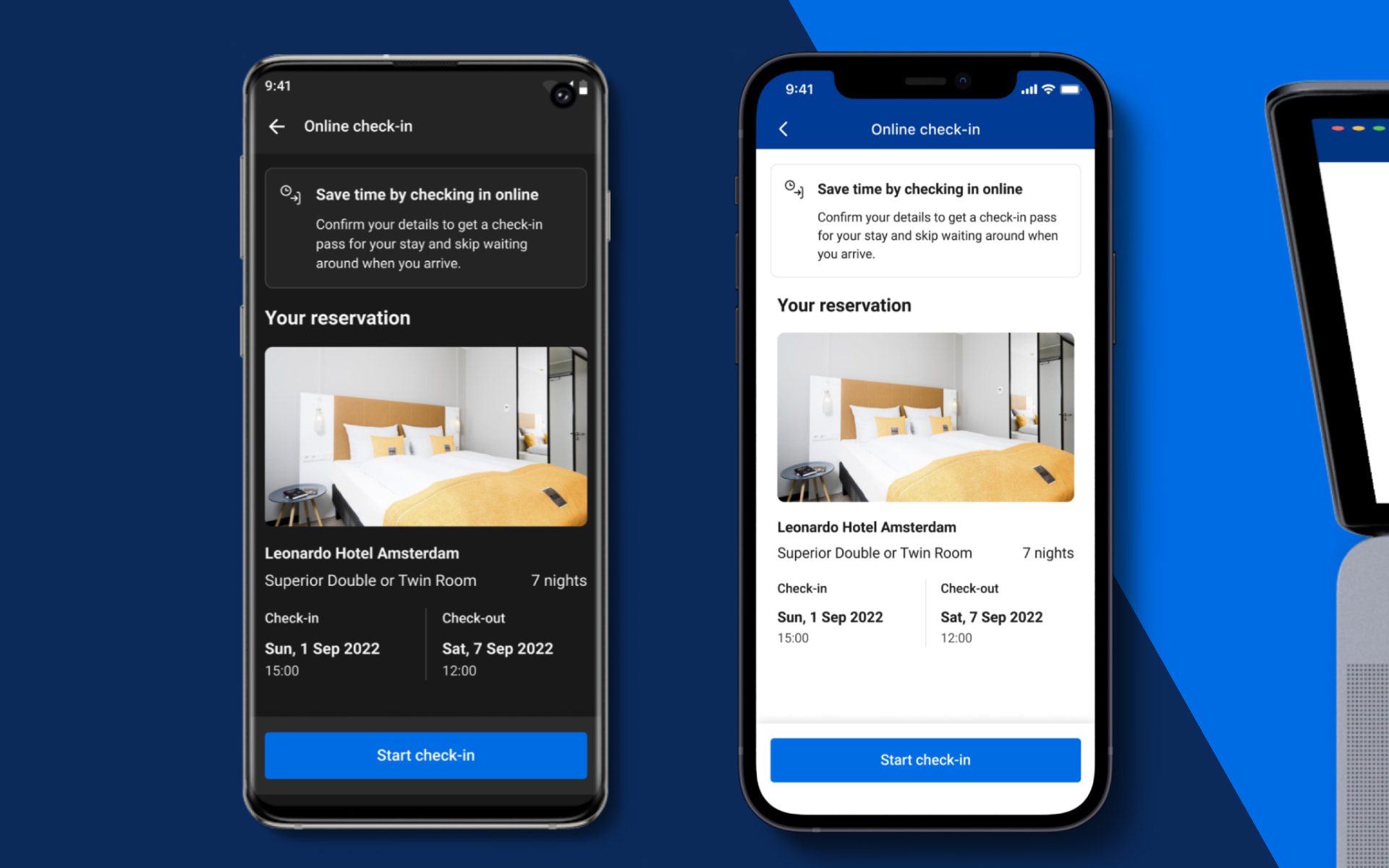
The arrival moment, reduced to one decision: prompt, reservation, a single clear action.
Research, and who we designed for
Discovery ran across four methods with our supporting researcher: in-depth interviews with guests and property managers; remote usability testing on a working prototype to watch where people stalled; contextual inquiry inside hotels and at our software partners, observing the workarounds already in use; and joint analysis sessions that turned findings into decisions in the room where design happened, not into a report afterwards.
Past-usage data and interviews gave us three guest segments with genuinely different motivations, and two property archetypes with different economics.
- Solo business travellers
- Time-sensitive. Wanted to check in while in transit and walk straight to the room.
- Couples
- Optimising for destination time, not admin time. Any delay at arrival was time lost from the trip.
- Families and groups
- Hurt most. More people means more forms, usually after a long flight with tired children.
- Large hotels
- Needed relief from 24/7 front-desk staffing, especially outside peak hours.
- Small and apartment-style properties
- No desk at all. Manual key handovers meant a host waiting around for an unknown arrival time.
How we defined success
Before design started I agreed measurable success with our PM, PMM and data scientist, so every later decision had a scoreboard rather than an opinion.
- Conversion rate
- At least 20% of eligible guests completing online check-in. The bar was raised each time we cleared it.
- Operational efficiency
- A measurable reduction in the staffing needed to handle arrivals, particularly outside peak hours.
- 5%
- 20%
- 71%
Before and after: from pilot to a complete guest journey
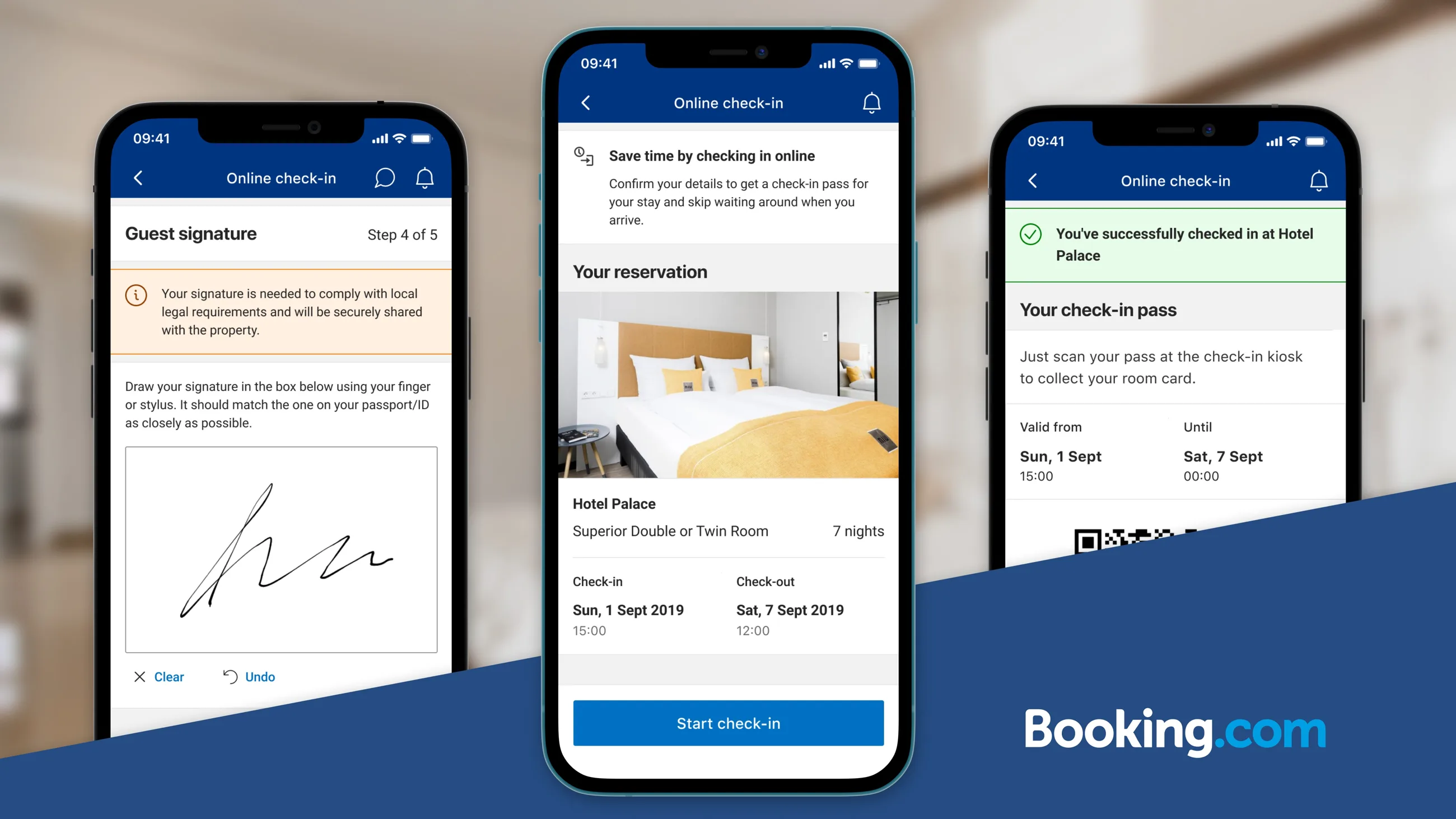
The pilot stitched together a check-in prompt, a separate starting page, guest details and a completion screen. It proved that guests would do the work before arrival, but each handoff introduced a place to lose them. We moved entry closer to the booking, reduced the questions using the legal audit, and designed the final journey as a sequence guests could understand and finish on a phone.
The first iteration clarified the start, signature and pass. The second joined those moments into a complete mobile journey: identity and address details, signature where required, a review guests could correct, confirmation and the pass. Desktop used a single-page form; mobile grouped the same information into steps with visible progress. The original boards below show the pilot and iterations rather than only selected screens.
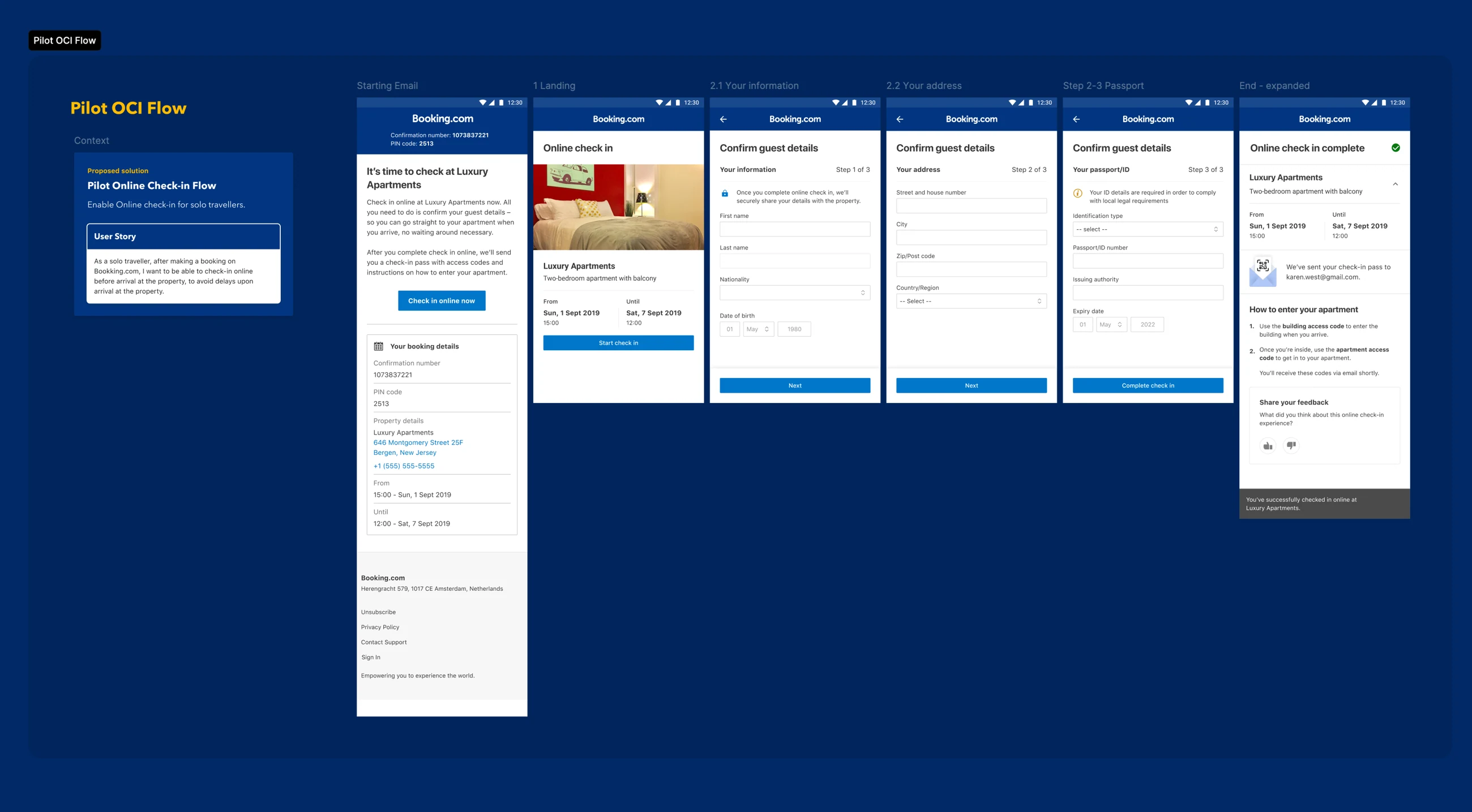
Before — pilot journey: the email prompt and separate landing page precede a short guest-details flow.
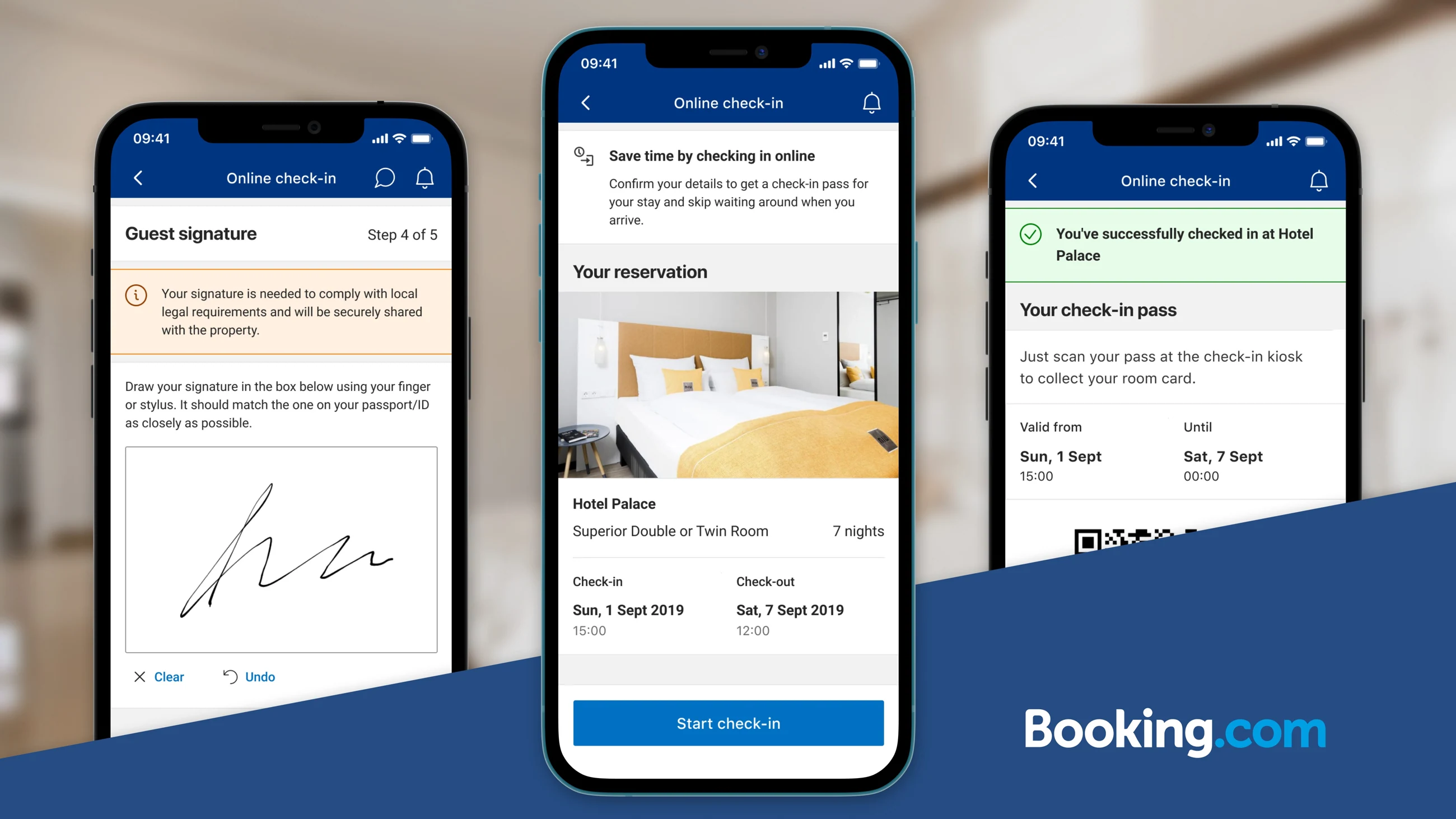
Iteration 1 — the entry, legal signature and check-in pass as three key moments.
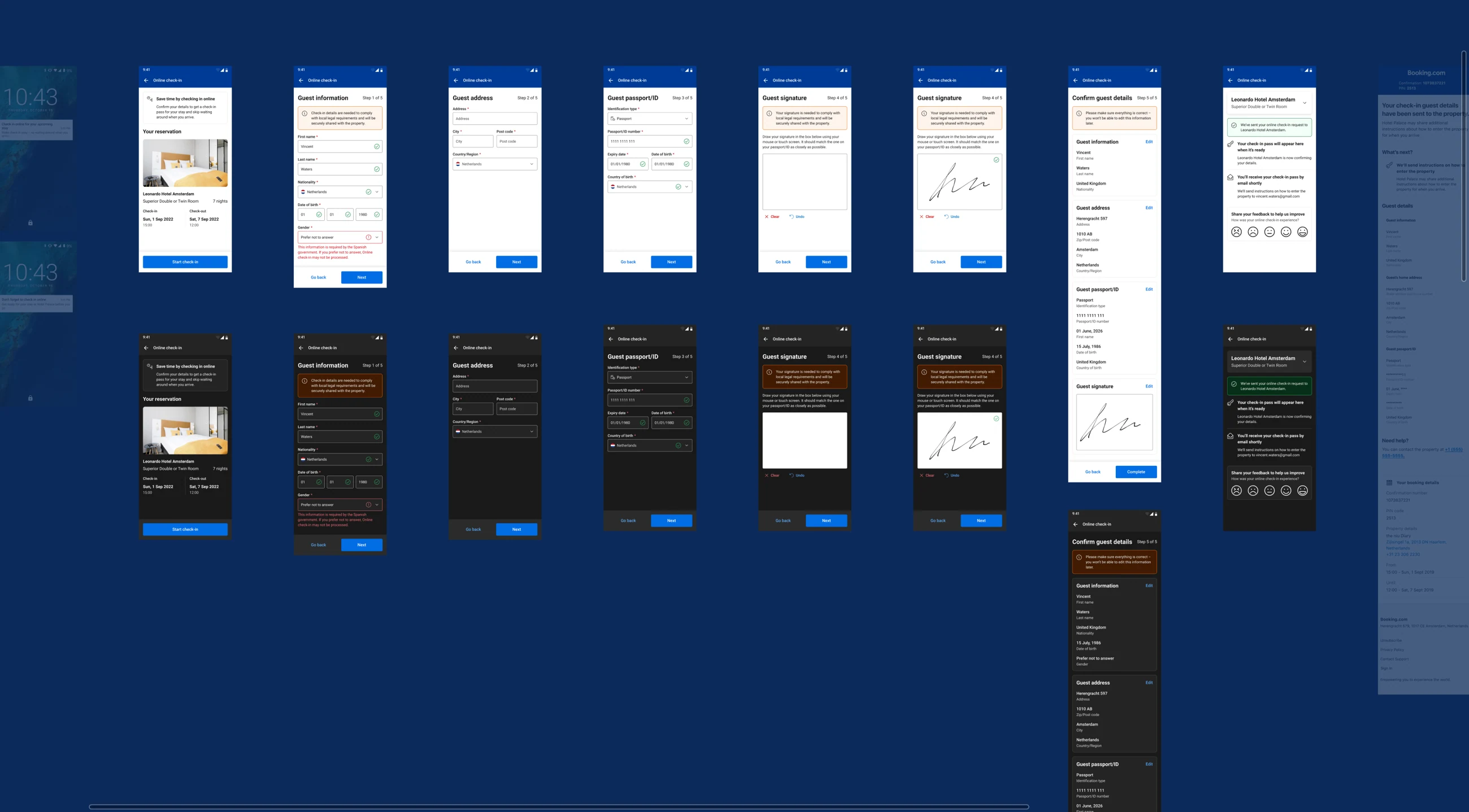
Iteration 2 — the full mobile sequence in light and dark modes. Open to inspect each step.
45
Cut what the law doesn't require
Before touching a single field I went after the obligation behind it. I initiated and led an audit of check-in regulation across 45 countries, working with legal and with local market teams, and used it to remove every field that was not legally required in that market. In most regions this stripped the form down materially.
Structure was then decided by evidence rather than convention: usability testing showed a single-page form converted best on desktop, while a grouped multi-step form with progress indicators won on mobile. The team shipped both from the same content model.
Inherited form
- One global field set, sized to the strictest market
- Fields kept because a property once asked for them
- Same questions whatever the guest's destination
Law-audited form
- Field set resolved per market from the 45-country audit
- Anything without a legal basis removed outright
- One content model, rendered as a desktop page or mobile steps
Fewer questions, decided by law
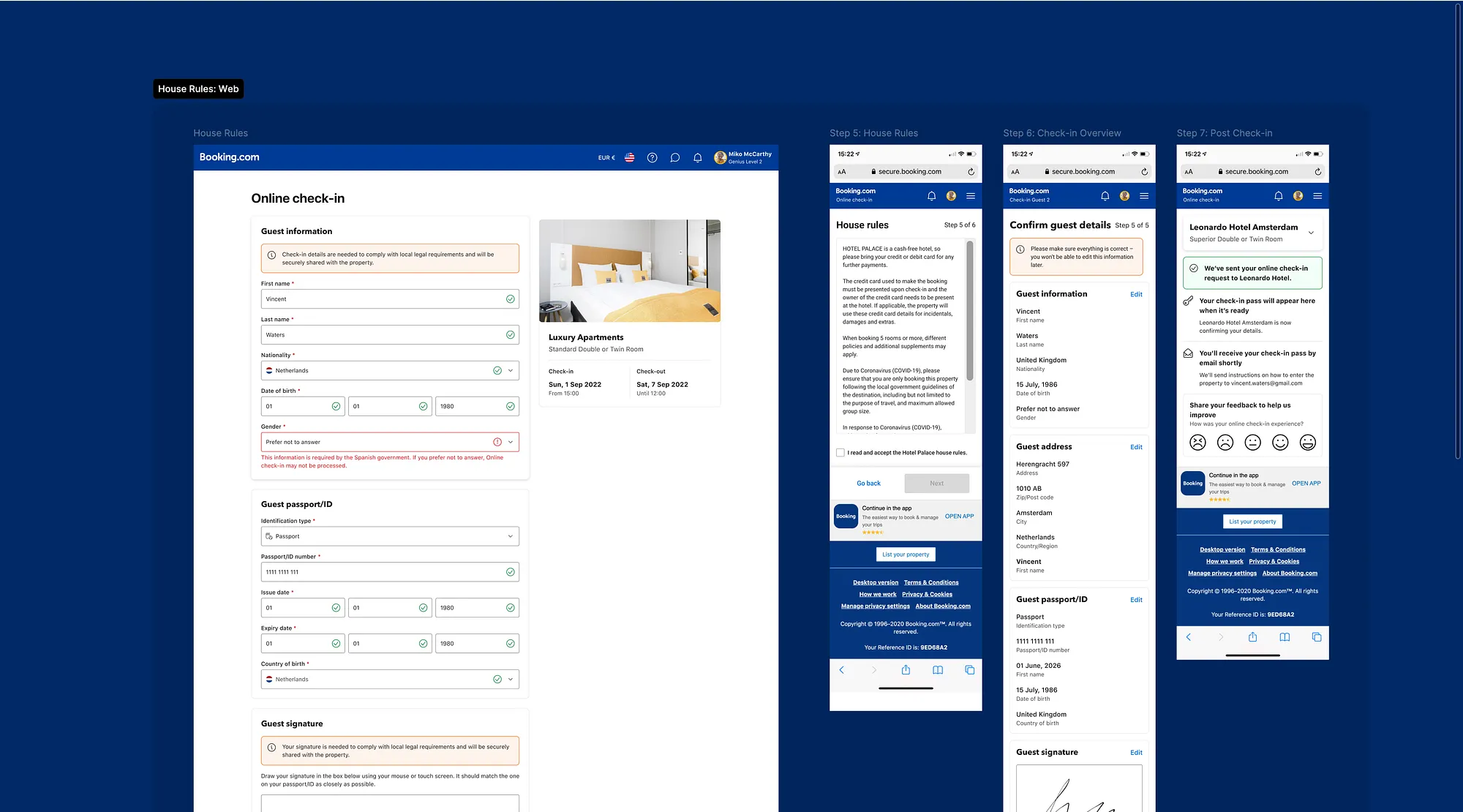
Same content model, two structures: one desktop page against grouped mobile steps, including house rules where properties require acceptance before key exchange.
-25%
The trust problem: passport data
What the law did require still leaked. The biggest single drop in the funnel was the passport step: guests stopped when asked for identity documents without being told why. It read as data collection, not compliance.
I designed the fix as explanation rather than visual polish: plain-language messaging stating that the information is required by local law and shared securely with the property, a help tooltip that answered the follow-up question in place, and security signalling positioned exactly where sensitive data is entered. I specified it as an A/B test with our data scientist, a base variant with minimal explanation against the redesigned one.
Base variant
- Document fields requested with no stated reason
- Help copy lived on a separate page, off the flow
- No security signal at the point of entry
Redesigned variant
- Plain-language legal requirement stated in place
- Tooltip answers the follow-up without leaving the step
- Secure-handling badge next to the sensitive fields
-25% drop-off
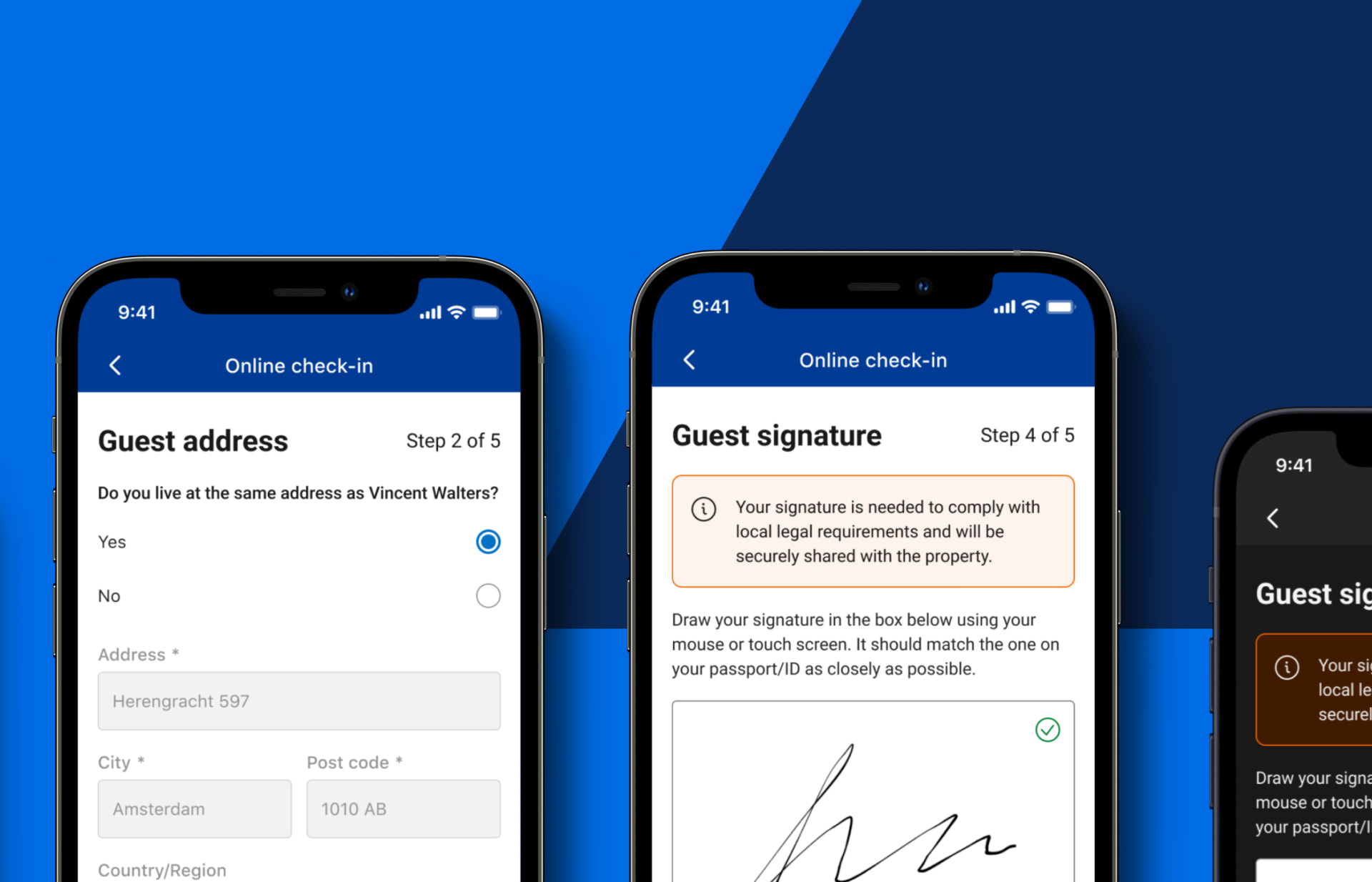
Legal-requirement messaging placed at the exact points guests hesitated, the change that moved the number.
Design implications from research: say why each sensitive detail is needed, and show trust signals at the point of entry.
Multi-guest, made native
Group bookings originally forced guests through a separate check-in flow for each person, the exact segment already under the most pressure. I added native multi-guest support so one person can complete the whole reservation, then merged the multi-guest landing page with the edit-guests page, removing a screen from the path entirely.
The earlier desktop experiment removed the separate multi-guest landing screen; the later mobile flow brought guest status and editing into the same journey. A guest could add or remove people, see who had completed their details and confirm destructive changes before saving. Both changes cut drop-off measurably on the pages they touched.
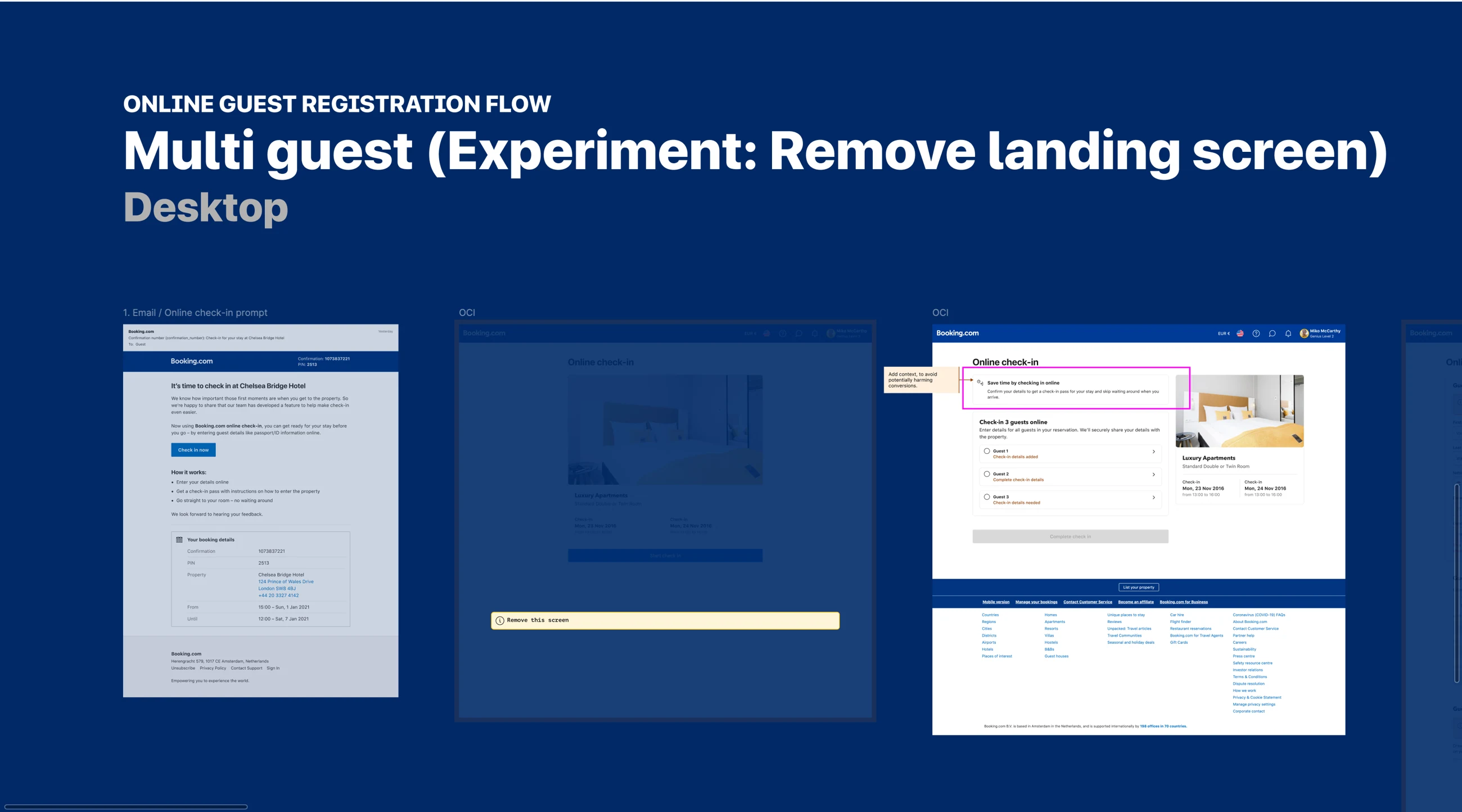
Before and after — removing a redundant landing screen from the multi-guest entry path.
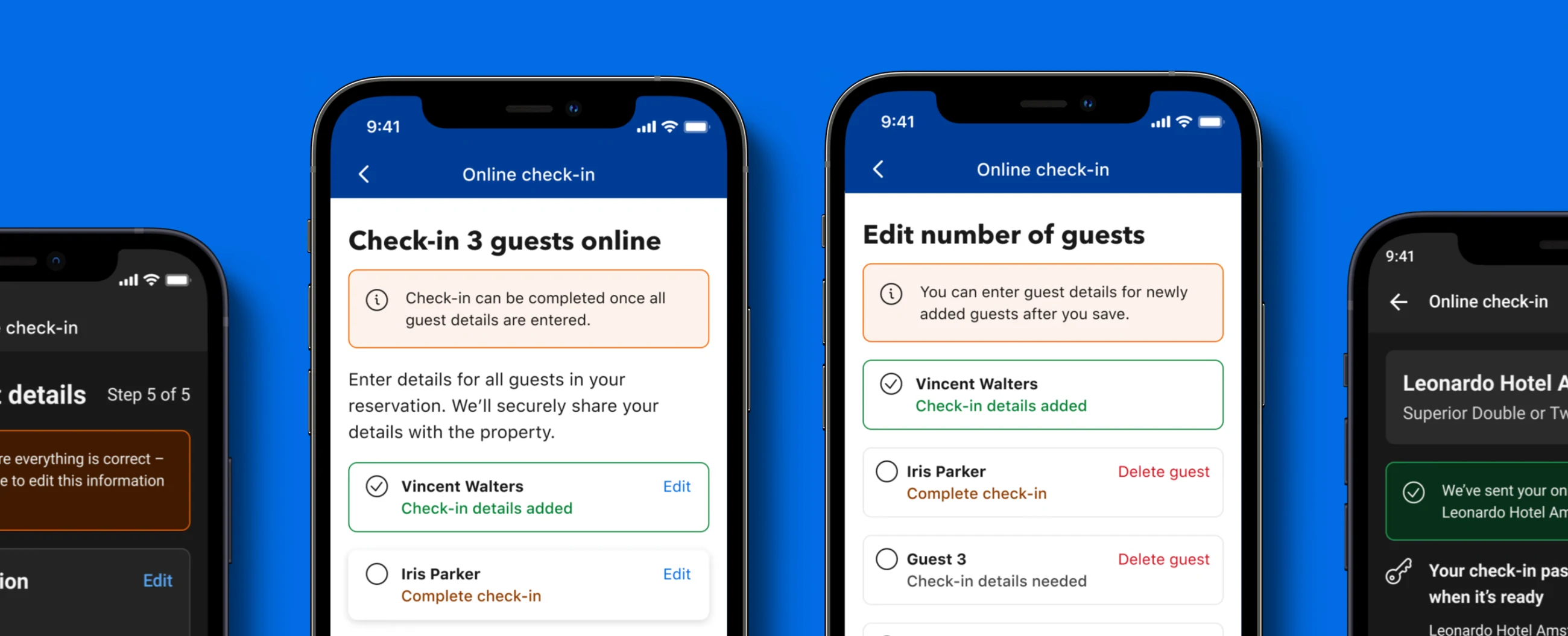
One person, one flow: each guest’s progress is visible from the shared booking, with editing available in place.
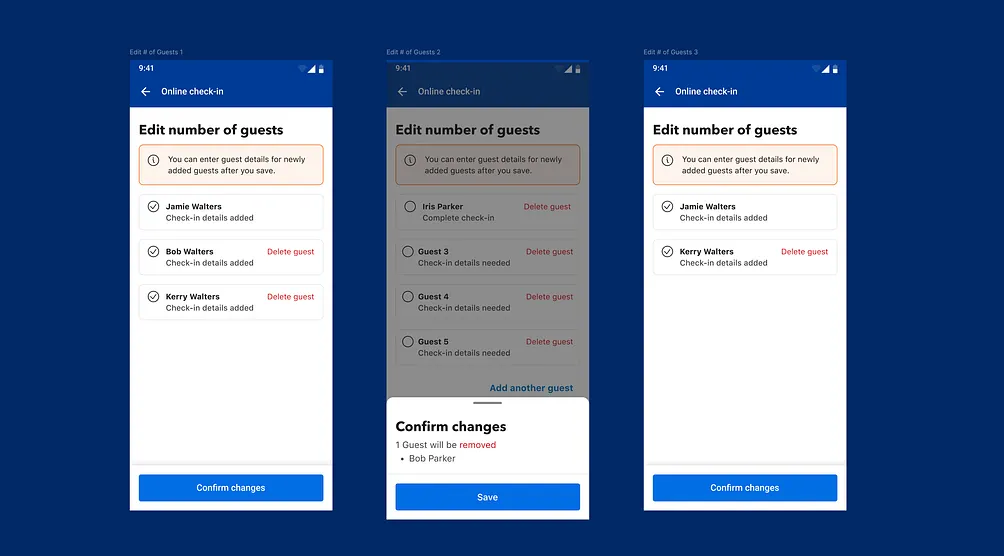
The merged edit-guests page, a removed screen, with destructive changes confirmed before saving.
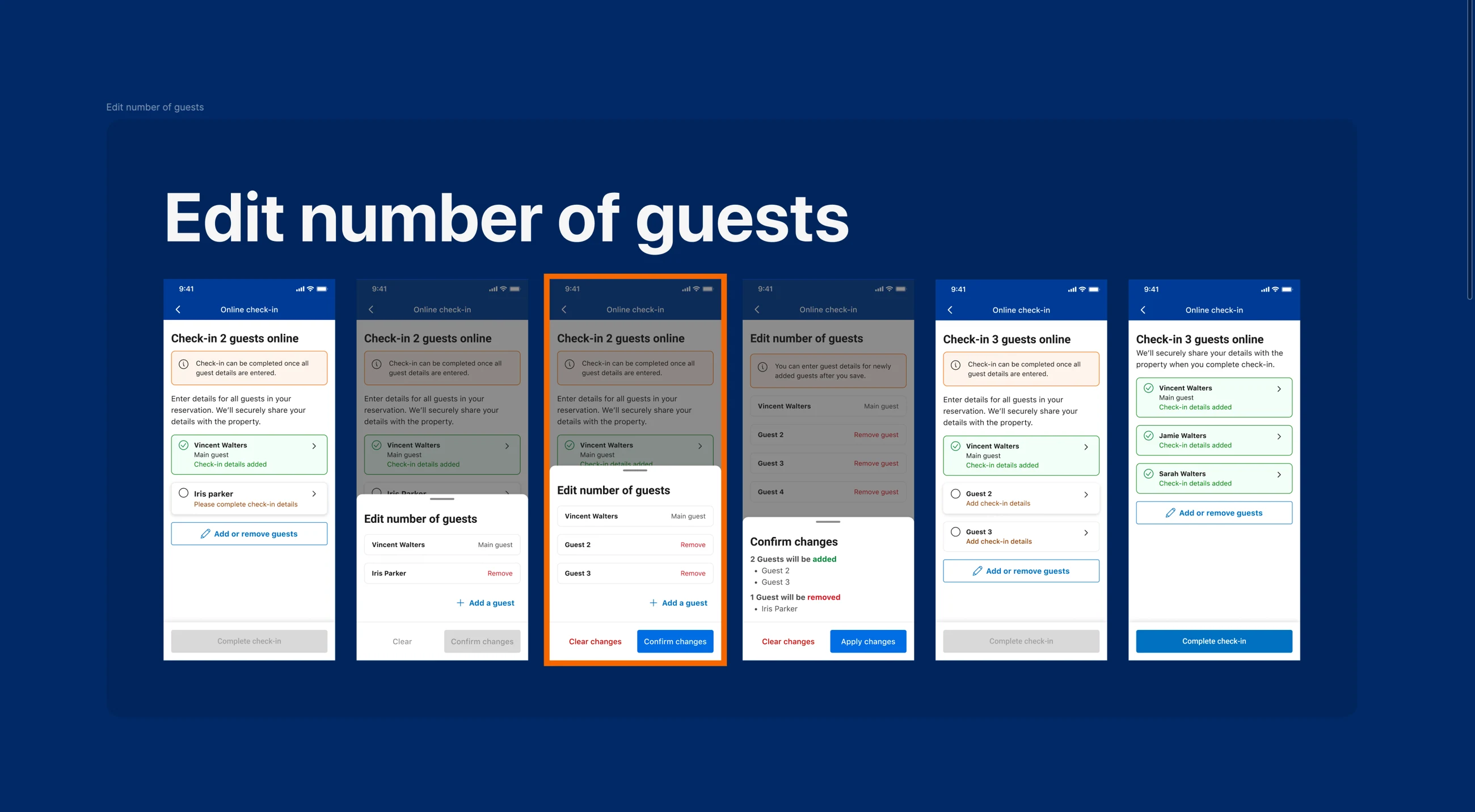
The complete edit flow: add guests, review removal, confirm the change, and return to the shared booking. Open to inspect the states.
How the decisions got made
For each problem I organised and facilitated cross-functional workshops: mind mapping to explore how we could communicate privacy and security, affinity diagrams to turn usability findings into a ranked list of what to fix first. Ideation started with me walking the team through the problem and the research, then wireframing the journey together.
Interaction design targeted cognitive load specifically, pre-filled details for returning travellers, which required a non-trivial integration with Booking.com's Identity Management team; one unambiguous primary action per step; progress indicators so guests always knew how much was left. Before build, I ran an implementation workshop with engineering and adjusted the design for the constraints that surfaced there.
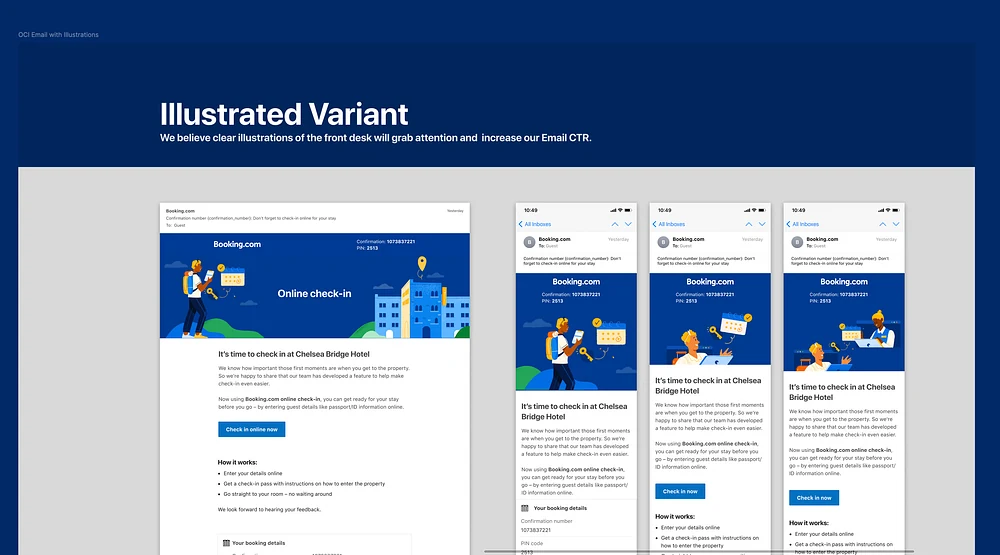
We also tested the entry point: an illustrated prompt email made the invitation clearer before guests reached the form.
Confirming and completing
The last steps carry the compliance weight: signature, house-rules acceptance where the property requires it, a full review of everything entered, and a confirmation stating exactly what happens next and when the pass will arrive. We added a feedback prompt at the end, which became a continuous source of qualitative signal after launch.
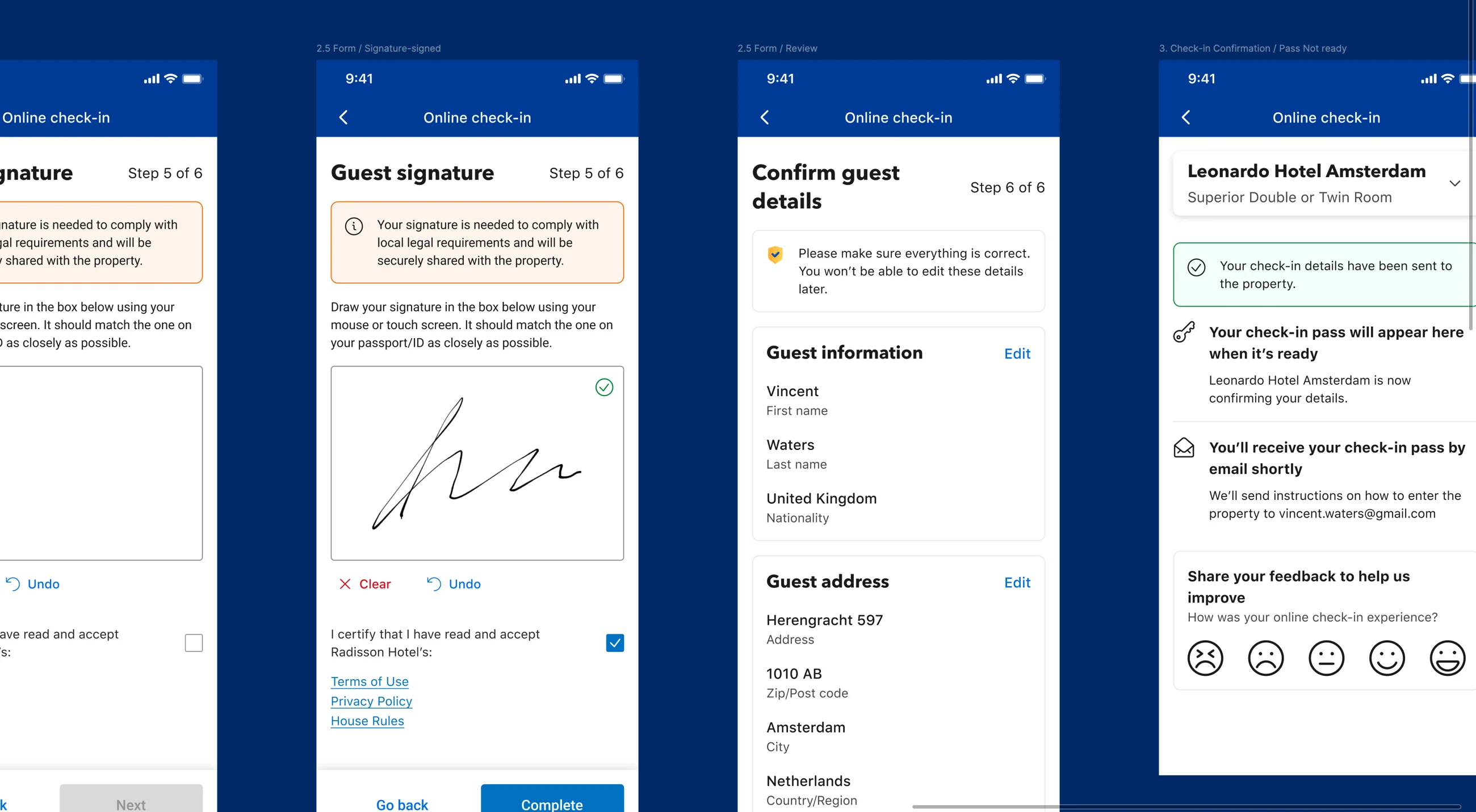
The final handoff: sign, review and correct guest details, confirm submission, then wait for a pass with clear next steps.
A complete arrival system
After two years of iteration the product was no longer a form. The pass matched the property's actual key-access method: a QR code for a self-check-in kiosk, instructions for front-desk key pickup, a lockbox code or PIN for an apartment, and a digital key where the property supported smart locks. Guests knew what to do on arrival instead of receiving a generic 'checked in' message.
Each supported access method made another kind of hotel eligible to offer Online Check-in, from staffed chains to independent properties without a desk. After arrival, directions, late checkout, online check-out and key-drop actions closed the loop at the other end of the stay.
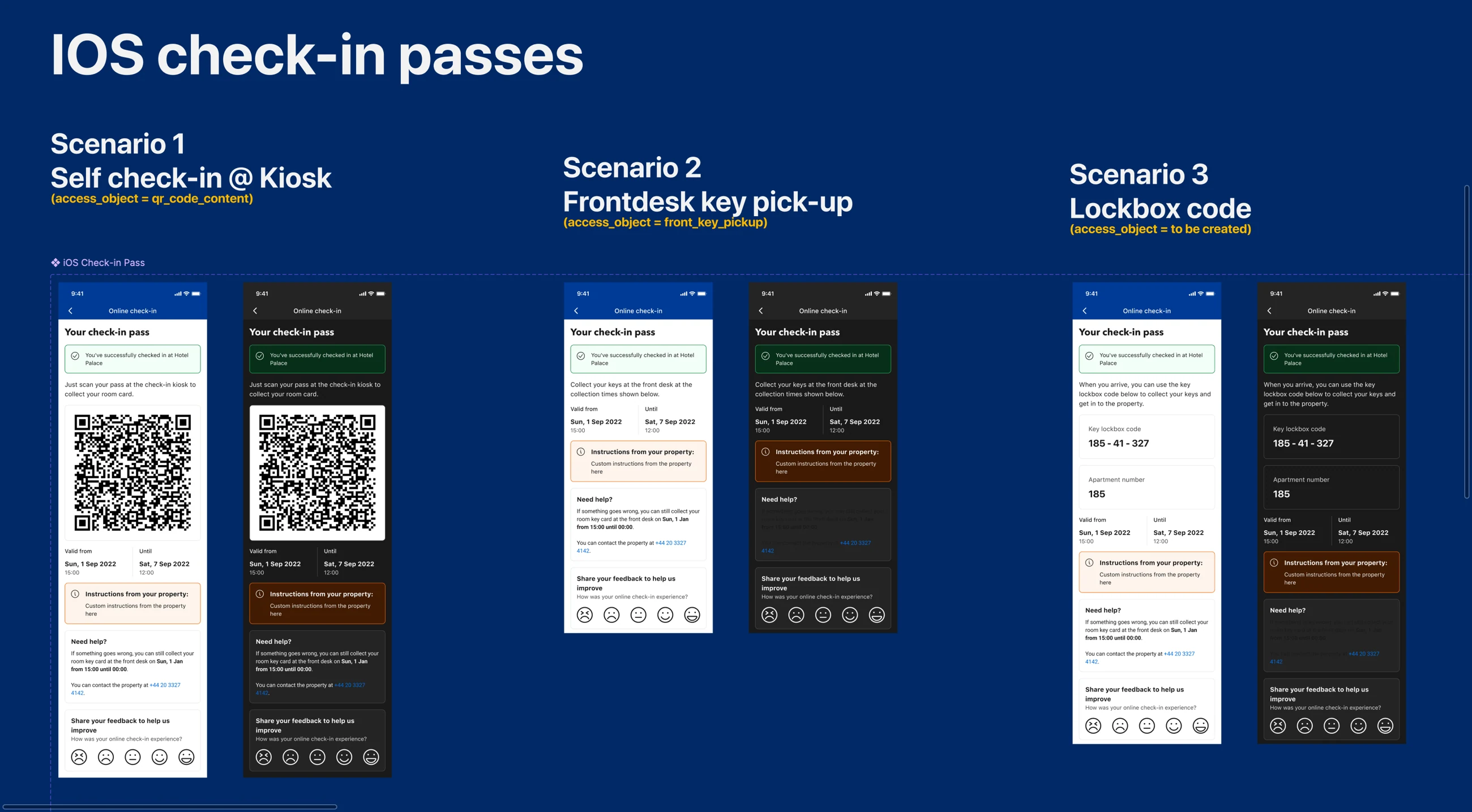
One pass, three real arrival scenarios: kiosk QR, front-desk pickup and lockbox code. Digital-key support covered smart-lock properties too.
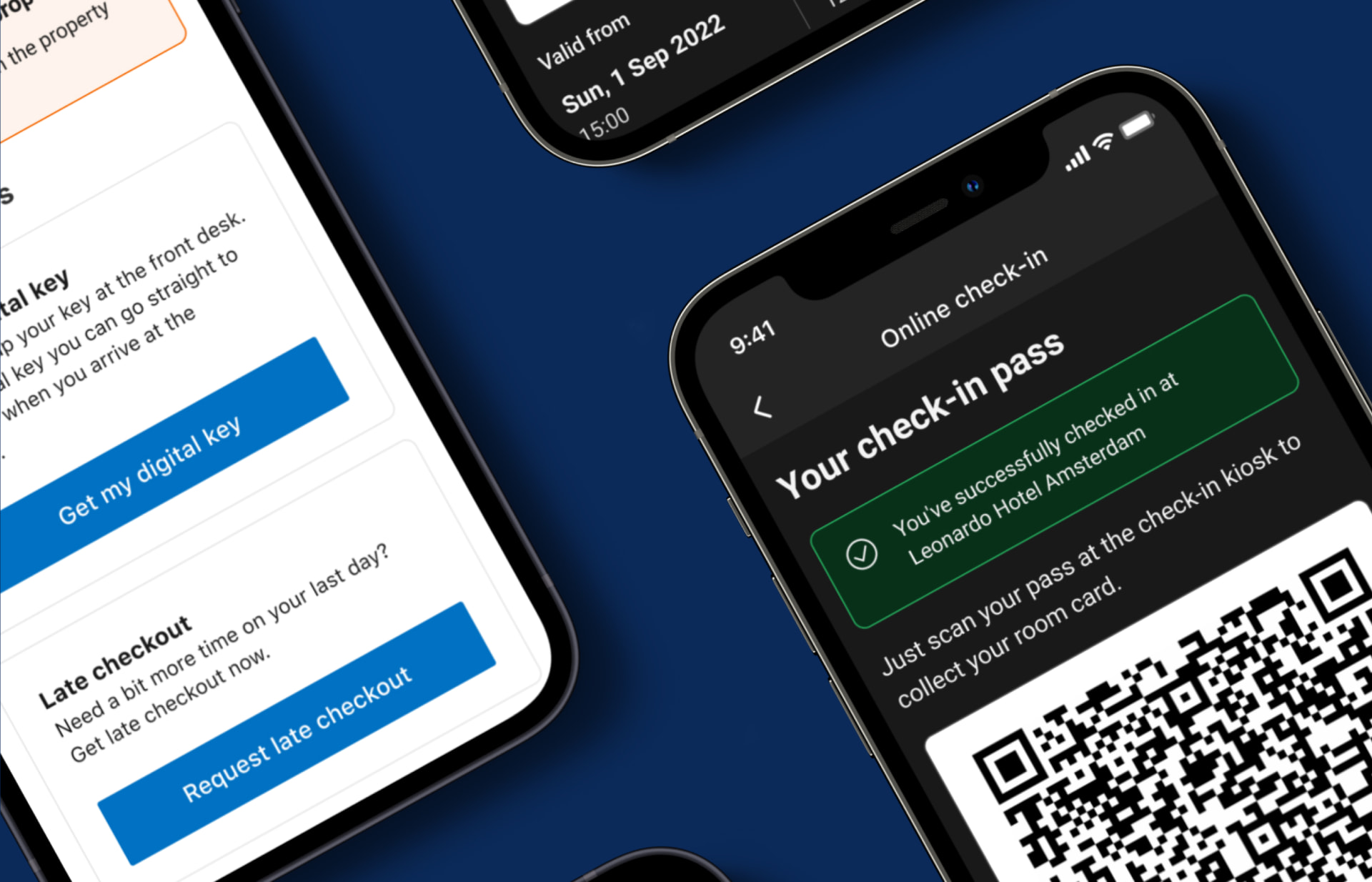
The pass adapts to the property: QR code, digital key, or instructions for a physical one.
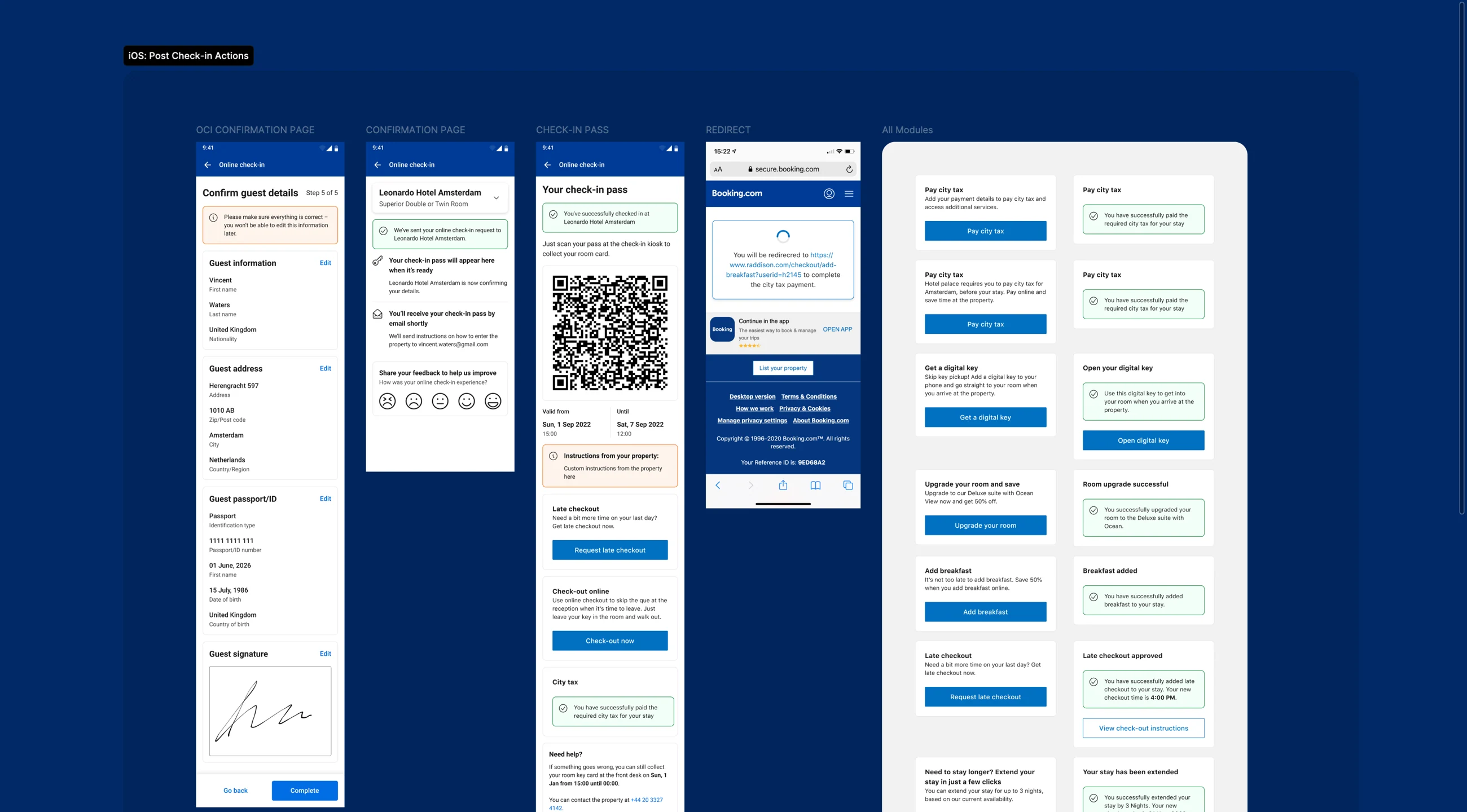
After check-in, the same surface holds arrival instructions and the next actions a guest can take during the stay.
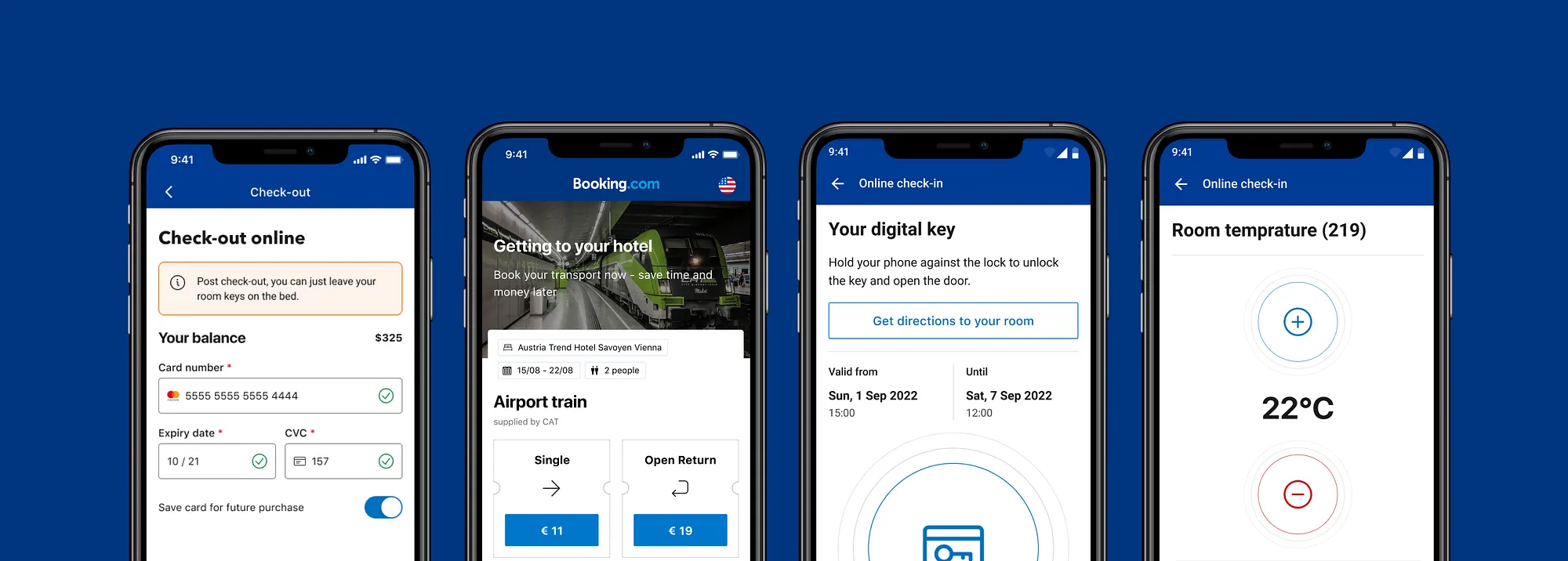
The same surface at the other end of the stay, balance, onward transport, in-room controls, check-out.
71%
Validation after release
Every release was wrapped in an A/B experiment against a stated hypothesis. Session replays and heatmaps showed where guests hovered, hesitated and abandoned, particularly around sensitive data, and the post-check-in feedback prompt gave us the qualitative half of the picture.
The best-performing flow converted at 71% against a 20% target. Across all flows, property types and regions the average exceeded 23%, the highest in the industry, which we could verify because most competing check-in providers were also Booking.com partners.
- 20%
- 23%+
- 71%
Results
Outcomes
- Best-performing flow converted at 71% against a 20% target; the all-flow average exceeded 23% and was, by partner-data comparison, the strongest in the industry
- Detailed messaging and secure badges cut drop-off at the passport step by 25%
- Partners reported lower front-desk staffing needs for check-in, freeing desk staff to focus on other work
- Leadership approved and funded global rollout after the pilot
Reflection
Learnings
- Transparency converts: explaining why data is needed beat every visual treatment we tried
- Regulation is a design material, the 45-country legal audit removed more friction than any UI change
- Platform assumptions need testing: one page won on desktop, grouped steps won on mobile
- Leading from design means owning alignment, research framing, stakeholder negotiation and implementation workshops were as much of the job as the screens